
Nobody plans to run an end-of-life firewall. It just happens. The kit was installed years ago, it still passes traffic, and the date when the vendor stopped supporting it went past quietly in a PDF nobody read. Then one day a cyber insurance questionnaire asks whether all your security appliances are vendor supported, or an auditor asks when your firewall last received a firmware update, and suddenly it matters a great deal.
The awkward part is that checking should be simple but is not. Cisco Meraki, Fortinet and Palo Alto Networks all publish their end-of-life dates, but they publish them across sprawling support portals, bulletins and tables that take real time to dig through. So we built three free tools that do the digging for you.
Three checkers, one job
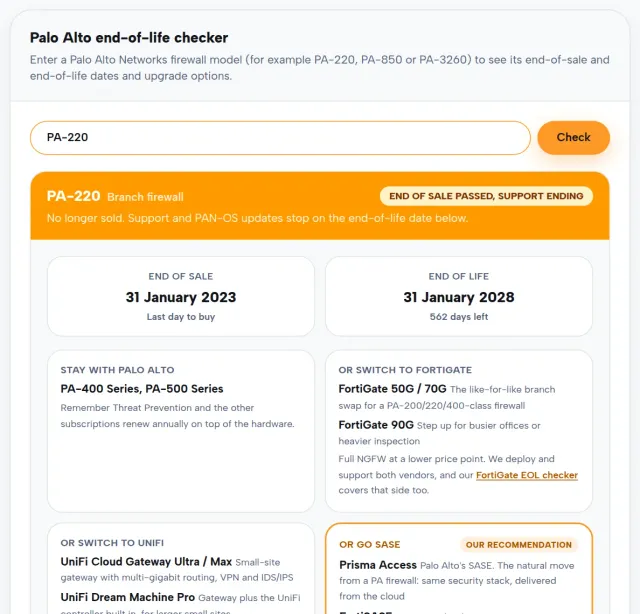
Each tool works the same way. Type in your model number and you get an instant answer: whether the product is end of life, when sales stopped, when support stops or stopped, and what your sensible upgrade paths look like.
The Meraki EOL checker covers more than 150 Meraki models across access points, switches, security appliances and cameras. Alongside the dates it shows you the like-for-like Meraki replacement and the licence-free UniFi alternative, because for plenty of businesses the renewal bill is the moment to ask whether the ongoing licence cost still makes sense.
The FortiGate EOL checker covers more than 170 FortiGate and FortiWiFi models. FortiGates are workhorses and tend to stay racked long past their support dates, which is exactly the problem. The tool gives you the end-of-order and end-of-support dates plus upgrade options across Fortinet itself, Palo Alto, UniFi and zero-trust SASE if you are ready to rethink the perimeter altogether.
The Palo Alto EOL checker covers the PA series, more than 80 models, with end-of-sale and end-of-life dates and the same honest spread of options: the recommended Palo Alto upgrade, or a look at FortiGate, UniFi and SASE alternatives.
All three run straight in your browser. No sign-up, no email gate, no sales call triggered by using them.
Where the dates come from
Every date in these tools comes from the vendors’ own published life-cycle data: Meraki’s end-of-life notices, Fortinet’s product life-cycle tables and Palo Alto’s official end-of-life announcements. If a model or a date is not in a published source, it does not go in our data. We would rather the tool said “we don’t have that one” than guess.
Why end of life is a bigger deal on a firewall
Any ageing hardware carries some risk, but a firewall is a special case. It is the box that faces the internet all day, every day, and it is only as good as its last security update. Once a model passes end of support, the vendor stops shipping fixes, so every vulnerability discovered from that day on stays open for good. Attackers know this, and unpatched edge devices have become one of their favourite ways into a network.
There is a practical cost too. Unsupported kit can hold you back from Cyber Essentials certification, complicate insurance renewals, and leave you without vendor help on the day something breaks. When a firewall fails at 2am with no support contract behind it, the outage lasts as long as it takes to source and configure a replacement from scratch.
Found something on the list? Here’s what we’d do
First, don’t panic. End of sale is not end of support, and the gap between the two is often years. The dates in the tools tell you which side of that line you are on, and how long you have to plan properly rather than buy in a hurry.
If support has ended or is close, the honest answer is to treat it as a project, not a swap. A replacement is the natural moment to revisit what the firewall actually needs to do now: remote workers, cloud traffic and SaaS apps have changed the job since that box was first racked. As a vendor-independent MSP we design, deploy and support Fortinet, Palo Alto and UniFi alike, so our recommendation starts with your estate and your budget rather than a reseller margin. Our network remediation team handles the migration itself, and our network operations centre watches the new kit around the clock afterwards.
Check your kit now
Grab the model numbers off your firewalls and access points and run them through the Meraki, FortiGate or Palo Alto checker. It takes under a minute, and the worst outcome is confirmation that you are fine.
And if the tool does flag something, get in touch. We will give you a straight answer on how urgent it really is and what your options are, with no pressure attached.