
Every acquisition comes with a Microsoft 365 tenant attached. For the first year or so, most groups cope: a few guest invitations, some cross-tenant synchronisation, a shared Teams channel here and there. Then someone notices that the group is running three or four security baselines, nobody can see a single address book, licences are being bought on four separate agreements, and the IT team is administering everything four times over.
That’s usually the point where we get the call. Tenant consolidation is one of the projects we deliver most often, so here is what it actually involves, what catches people out, and how to get through it without the business losing a week.
Start with honest discovery, not a migration tool
The temptation is to buy a migration tool and start moving mailboxes. Don’t. The first week should be read-only discovery across every tenant: users, mailboxes and their sizes, OneDrive and SharePoint volumes, Teams and private channels, guests, distribution lists, domains, mail flow, devices, enterprise applications, Power Apps and flows, and any Dynamics or Business Central environments.
The numbers decide everything that follows. A single marketing SharePoint site running to well over a terabyte will dictate your calendar more than any project plan. Mailboxes over 50 GB decide your licence plan. And the discovery almost always finds things nobody mentioned: a dozen extra email domains, a third-party DNS provider nobody has credentials for, or a forwarding rule sending company mail to a personal address.
Licensing is a redesign, not a transfer
Two facts about licensing surprise people every time.
First, Microsoft subscriptions cannot be moved between tenants. You buy new subscriptions in the destination and let the old ones lapse at renewal. That means mapping every renewal date across every tenant in week one, because those dates drive the most cost-effective order for the migration waves. Get this wrong and you pay for two sets of licences for months.
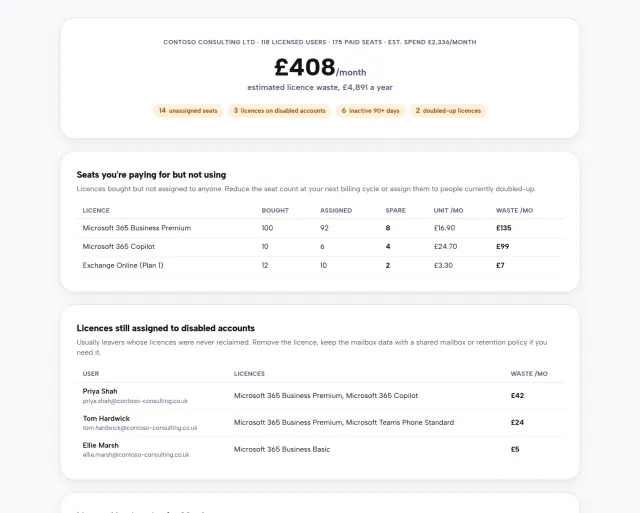
Second, Business Premium is capped at 300 seats per tenant. Three companies on Business Premium can add up to more than that once consolidated, and the overflow steps up to Microsoft 365 E3. That’s a design decision with a price tag, and it needs making before anything moves. Our Microsoft licensing team usually finds unassigned subscriptions along the way that simply shouldn’t be repurchased.
A domain can only live in one tenant
This is the constraint that shapes the whole cutover. A custom email domain can be verified in exactly one tenant at a time, so each company moves with a weekend domain cutover: DNS TTLs lowered in advance, verification records pre-staged, the domain removed from the old tenant and added to the new one, addresses re-stamped, and SPF, DKIM and DMARC republished. Users keep their existing email addresses throughout, which is the thing they care most about.
The part that gets missed is everything else that sends mail on that domain: photocopiers and scan-to-email, line-of-business relays, marketing platforms, signature services and mail gateways. If the group runs different email security gateways in different companies (and they usually do), you need a decision about which one survives before the first wave.
For manufacturers and defence suppliers there’s a sharper edge still. Enforced TLS connectors to customers and partners have to be rebuilt in the destination before the domain moves, or mail to your most important customers silently drops to opportunistic encryption, or fails altogether.
Identity is where the real engineering sits
If the companies have been collaborating through cross-tenant synchronisation or a multi-tenant organisation, every migrating user already has a stub account in the destination. Those stubs conflict with the real accounts coming in, so they need unwinding in the right order, wave by wave, with soft-match blocked so synchronised users never land on the wrong object.
Where companies still run on-premises Active Directory, you can’t point two directory sync servers at one tenant. The pattern that works is cloud synchronisation scoped to a security group, with mail attributes held back until cutover and a short password freeze while accounts are created. Hybrid-joined PCs need their own plan, and one job comes before every other: back up the BitLocker recovery keys. Discovery regularly finds fleets of PCs where almost none of the keys are escrowed anywhere.
Pick the tool for what you’ll lose, not what you’ll gain
Every migration tool moves mailboxes and OneDrive. The differences are at the edges: whether private Teams chats move, whether SharePoint permissions survive, whether devices can re-join without rebuilding profiles, and whether mail coexistence is available between waves. We assess the options each time rather than defaulting to one, and we tell users plainly what won’t come across (one-to-one chat history is the usual casualty) before it happens rather than after.
The applications nobody listed
The tenant is never just mail and files. Expect to find:
- Dynamics 365 and Business Central, which need tenant-to-tenant environment moves timed around month end, with ISV add-on licences re-registered with the vendor.
- Power Apps and Power Automate flows built by users in the default environment, which no tool moves. They’re inventoried, triaged for business criticality and redeployed with their owners.
- Single sign-on integrations such as VPN, service desk, backup and developer platforms, all of which break at cutover unless rebuilt first.
- Teams Phone numbers that the carrier must release and re-provision, with call queues and auto attendants rebuilt and tested on the cutover weekend.
Build security once, in the destination
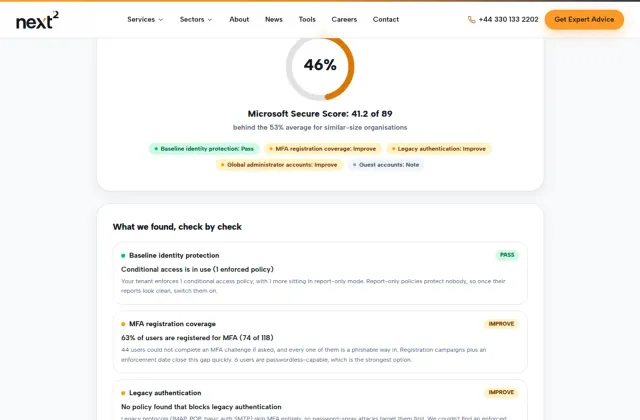
The consolidated tenant should not inherit the weakest baseline in the group. Conditional access, MFA, Intune compliance, Defender and data protection policies are designed once, to the standard the most demanding customer requires, and signed off before anyone moves. Two practical notes: don’t enforce device compliance on migrating users before their devices are enrolled, or you’ll lock out an entire company on Monday morning, and expect to retire a long list of Global Administrator accounts that have accumulated across the source tenants. Ten or more per tenant is normal. None of them should carry over.
Waves, pilots and hypercare
We migrate one company at a time: a pilot cohort first to prove the runbook, then each company as a wave with its data pre-staged weeks ahead and a short cutover window. Each wave gets communications, briefing sessions, engineers walking the floor on the first two mornings, and a month of hypercare with a named engineer and defined exit criteria. That support wrap is not a nice to have. It’s the difference between a migration the business remembers as a weekend and one it remembers as a quarter.
What you end up with
One identity platform, one security baseline, one address book, one Teams environment, one licence agreement, and a proven pattern for the next acquisition. Groups that have been through it once usually find the second consolidation takes half the time.
If you’ve inherited a tenant or two and want an honest view of what consolidating them would involve, our Microsoft 365 tenant migration service starts with read-only discovery, and the report is useful whether or not you go ahead. Get in touch and we’ll take a look.